.svg)





Most marketers think of ad blockers as an advertising problem. Users install an extension; your display ads stop showing, and revenue from that impression drops to zero. Annoying, but bounded.
But the bigger problem behind ad blockers happens behind the scenes. Because the same extension that hides a banner also blocks the request that would have told you the visit happened at all, the person browsing your site with an ad blocker is essentially invisible in your system, from your analytics to your retargeting audiences, and the conversion data your ad platforms use to optimize. You are still paying to reach them, but you just can't see them anymore.
Critically, these users tend to be exactly the people you'd want to see. Ad blocker use is highest among younger adults, higher earners, the college-educated, and employed people with kids, the segments most marketers are actively trying to reach.
If a meaningful share of your traffic is using an ad blocker, you are essentially dealing with a structural hole in your measurement.
Disclaimer: This article is about recovering measurement, not working around people's choices. An ad blocker is not a consent signal, and if someone declined tracking, they must stay untracked. This article addresses the data lost from users who did consent.
What is an ad blocker and what does it actually block
An ad blocker is a browser feature or extension that stops tracking requests, whether for advertising, analytics, or affiliate tracking. But these tools are broader than the name suggests and not only remove ads but also block the measurement layer underneath them.
How does it work in practice? As your page loads, the ad blocker inspects every request the browser tries to send and checks it against constantly updated blocklists. If a request matches, it never leaves the browser. Public lists flag the obvious signatures, such as calls to googletagmanager.com or scripts that look like Google Tag Manager or Google Analytics libraries. Left unaddressed, that means Google Tag Manager and Google Analytics are blocked outright for that visitor, before a single event is recorded.
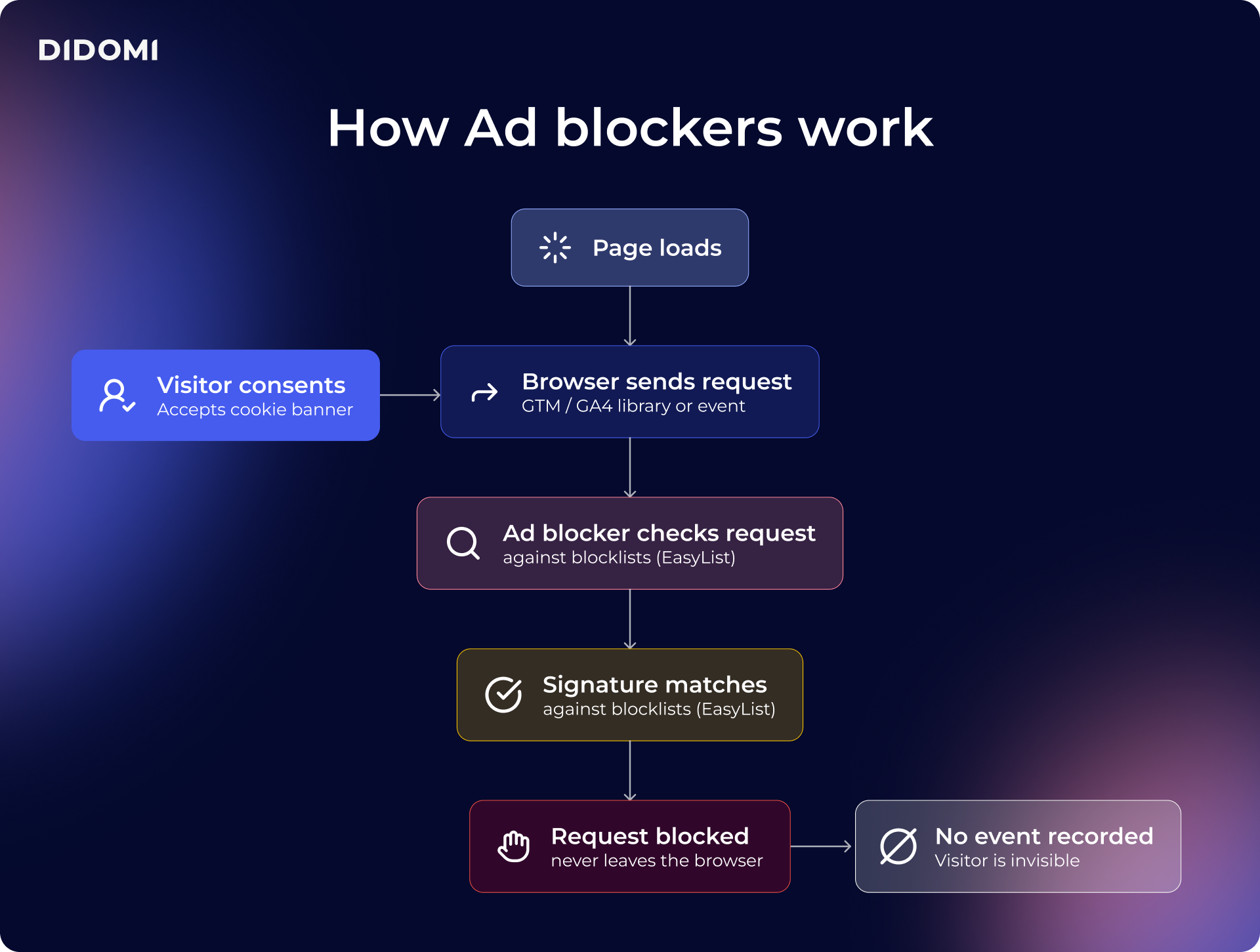
This also applies to user consent. A visitor can land on your site, accept your cookie banner, and genuinely want to be counted, but the ad blocker will still silently drop the request. Consent and collection are two different layers, and obtaining the first does nothing to guarantee the second.
It is worth being clear once again about what this does and does not mean. The goal is to accurately measure the people who have agreed to be measured, not to bypass anyone's choice. A visitor who declines still counts as a decline, and server-side changes nothing about that, but it addresses the gap between the consent a visitor gave and the data you couldn't collect because they had also chosen, at a different time, to install an adblocker.
What is the business cost of ad blockers
A blocked request isn't just one missing data point. Because the same visitor would have counted toward your traffic, your conversions, and your ad audiences, a single block ripples across three different metrics at once:
- Under-reported analytics: Sessions, conversions, and revenue attributed to channels all read lower than reality, and not evenly. Because ad blocker usage correlates with audience type, some segments and campaigns look worse than they are purely because their audience is better at hiding.
- Distorted attribution: When a chunk of conversions never registers, your cost-per-acquisition looks inflated, and your return on ad spend (ROAS) looks weak. Teams then make real budget decisions off numbers that were wrong in a predictable direction, cutting channels that were actually working.
- Shrinking retargeting: Every visitor who never got measured never enters an audience. Your remarketing reach declines, your lookalike seed sets get thinner, and the ad platforms optimizing against your conversion signal are working from a partial picture.
None of this shows up as an error. The data simply describes a smaller, slightly distorted version of your performance, which can easily lead to misguided business decisions, since nothing looks wrong.
How server-side tracking changes the picture
Client-side tracking is so exposed because all the work happens inside the browser, on the ad blocker's home turf. Every script loads there, every request originates there, and the blocklists are written to recognize exactly those scripts and requests.
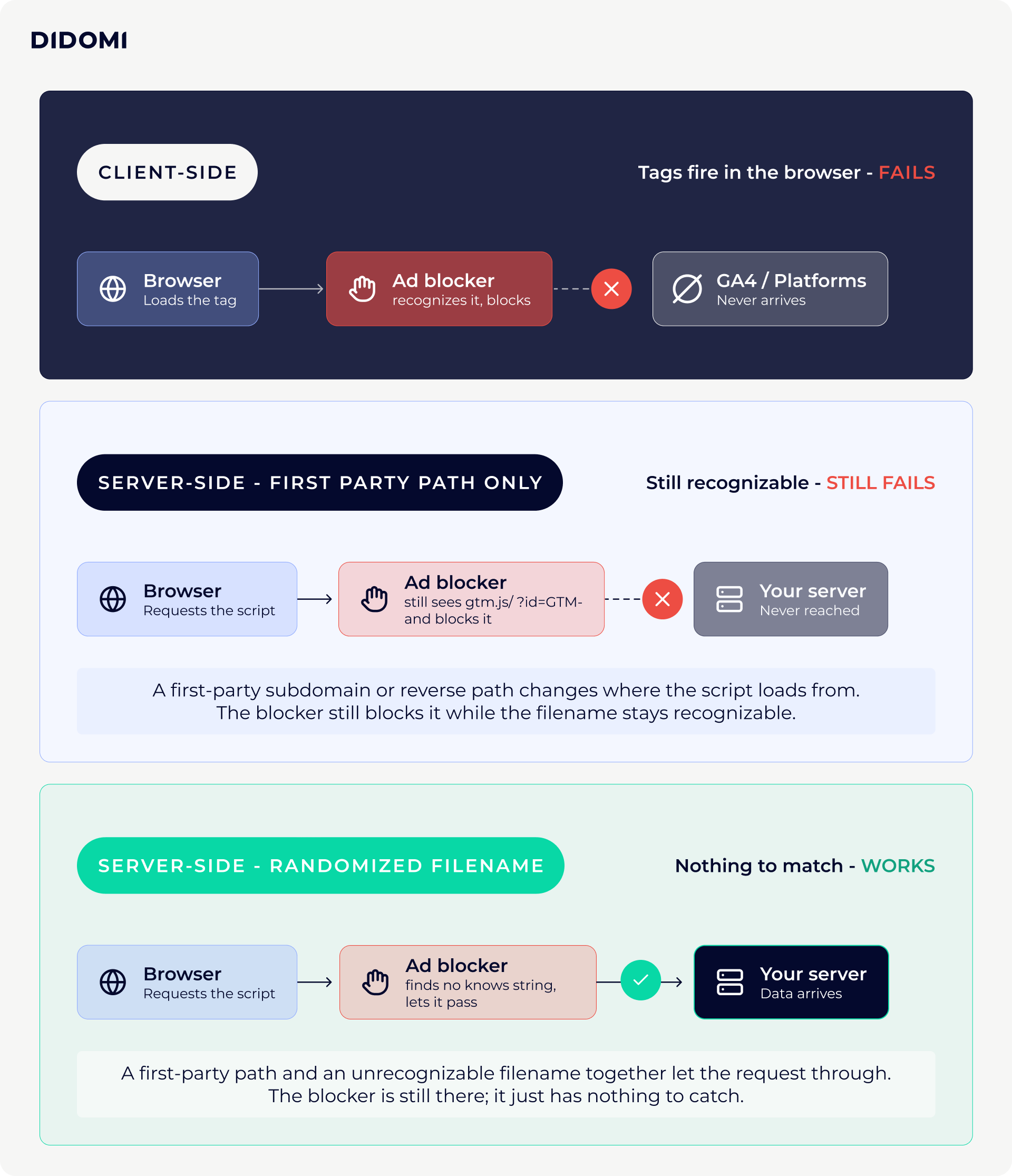
Server-side tracking moves the collection off that turf. Instead of firing every analytics and advertising tag from the visitor's browser, the browser sends data to a server you control that runs on your own domain as a subdomain or reverse path from your website. Tags fire from there. Data is collected in a first-party context, from your domain rather than from third-party scripts the blocklists already know by name.
This is critical for reasons beyond ad blockers, as moving collection server-side also improves site load time by removing a stack of third-party scripts and gives you real governance over what data goes to which partner, rather than letting an advertising SDK help itself from the browser.
Be mindful, however, that while server-side tagging is a first step, it is not a complete fix for ad blockers.
Server-side tagging is a crucial first step, but it isn’t a complete solution on its own. If the browser's initial request to your server follows a recognizable path, a sophisticated ad blocker can still intercept it. To close the gap entirely, you need to load your tracking components from URLs that aren't recognized by blocklists, so requests no longer match known signatures. This is solvable, but it requires deliberate configuration rather than simply enabling server-side tagging by default. For those ready to take that step, we've included a full practitioner walkthrough at the end of this article.
Server-side is the foundation for effective data governance and for recovering lost data.
It's the first time your data flows through infrastructure you actually own, which means governance is possible. Everything good downstream starts there.
- James Ensor, Head of Sales UK at Addingwell by Didomi
Get that last step right and the recovery is substantial. The clearest way to see it is in the numbers of teams who've done it.
Reclaiming accurate measurement with server-side tagging in practice
The best proof is what happens to the numbers after a proper setup, and publishers are an especially useful stress test, since their audiences are among the most ad-blocker-heavy on the web.
In a case study with a subscription publisher for healthcare professionals, Addingwell by Didomi showed the steps taken to prevent ad blockers from breaking paywall gating of premium content. By moving the setup server-side and hosting their tag manager in first-party mode under a renamed file, they restored their content protection, reached a 10% rise in paywall impressions, and lifted page views by 10%.
Discover more real-life use cases of server-side tracking in our case studies:
{{addingwell-case-studies}}
Start recovering your lost data
Contrary to popular belief, ad blockers are not a fringe concern for advertising teams, but a measurement problem that touches every number your marketing operations reports on, and hits hardest among the audiences you most want to understand.
Server-side tracking is one way to solve this, provided you take it beyond the default setup to the point where your tracking requests are genuinely undetectable, which is where the real recovery happens.
And recovering the data is only half the job. Once you're capturing it again, the next question is whether it actually reaches the tools and decisions it was collected for, or ends up becoming what we call dead-end data:
Ready to go deeper into the technical side of ad blockers? Our practitioner guide walks through exactly how to recover this data with server-side tagging, step by step:
{{adblockers-server-side-tagging}}