.svg)




On June 15, 2026, Google changed how consent controls work for advertisers using Google Analytics and Google Ads together. Consent Mode is now the sole control governing how advertising data is collected and used in Google Ads, replacing a setup in which Google Analytics settings also served as a safeguard.
If your organization relies on Google's advertising and measurement tools, the accuracy of your Consent Mode implementation matters more than it did a month ago. Here is what changed, what is still to come, and how to make sure your setup reflects your users' actual choices.
What is Google Consent Mode
Consent Mode is Google’s framework allowing organizations to detect consent signals from their users and adjust their Google tags accordingly.
In practical terms, Google products will respect user consent, and Google will help you make up for lost data by filling the gaps using conversion modeling. A typical consent mode scenario will look something like this:
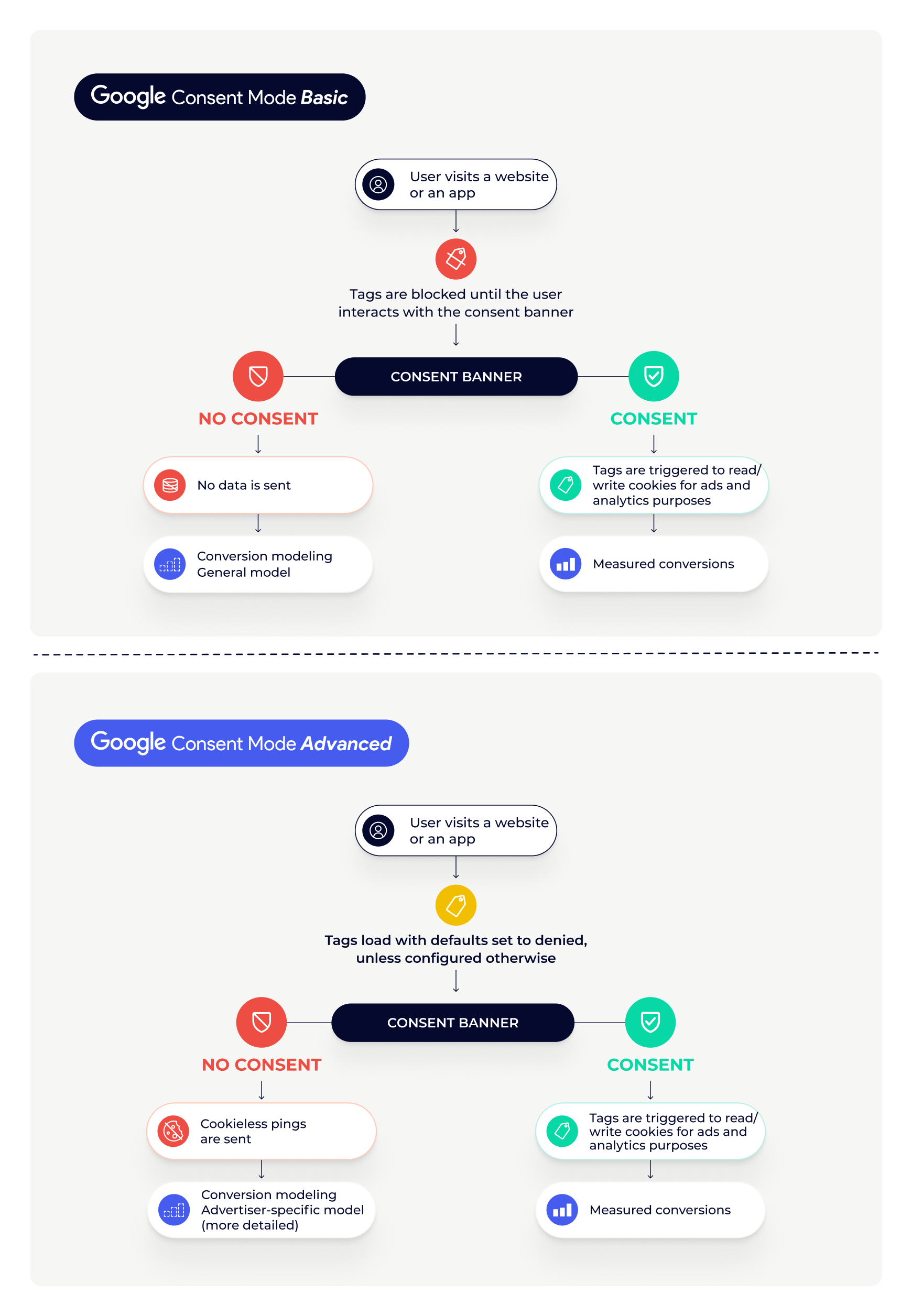
Your Consent Management Platform (CMP) sets a default consent state before any Google tag fires, then updates it once the user makes a choice. Google tags adjust their behavior based on that state, collecting full data when consent is granted and holding back when it is denied.
Since 2024, Consent Mode v2 expresses these choices through four parameters, including ad_storage for advertising cookies and ad_personalization for personalized advertising, both of which play a central role in the changes below.
{{google-consent-mode-blog}}
What changed on June 15, 2026
Before we get to the actual changes, let’s provide some context. Google Signals is a data collection setting in Google Analytics that governs how data about signed-in Google users is handled. When enabled, it enhances Analytics features, such as reporting on demographics and interests.
Up until June 15, 2026, advertising data from the Google Analytics tag and SDK was controlled by both the Google Signals setting in Google Analytics and Consent Mode. Google has now separated the two, so that each setting controls data where it is used:
- Advertising data, including data shared with a linked Google Ads account, is now governed exclusively by Consent Mode, through the ad_storage parameter
- The Google Signals setting now only controls whether Google Analytics data is associated with signed-in users for behavioral reporting within Analytics
Google explains the change as an effort to remove inconsistencies between advertisers' Google Analytics and Google Ads accounts, and to make it easier for them to continue honoring user privacy preferences with confidence.
Two related changes were announced at the same time but are not yet in effect. Later in 2026, the ad_personalization parameter in Consent Mode will become the exclusive control over whether Analytics data is used for personalization in a linked Ads account. Google also plans to encrypt IP addresses collected by the Google tag and SDK before they flow to linked Ads accounts. Exact dates for both changes have not been announced. Learn more about these changes in Google’s Documentation.
What does that mean for you as an advertiser?
Google Signals no longer acts as a backstop for advertising data. Until now, a disabled Google Signals setting could limit what flowed to your Ads account even if your Consent Mode implementation was misconfigured. Your Consent Mode signals now determine, on their own, what Google Ads collects and uses.
This matters most if your organization turned Google Signals off as a deliberate privacy measure. Since June 15, Google Ads uses advertising cookies whenever ad_storage is granted, regardless of that toggle, so review your ad_storage defaults and confirm they reflect your actual privacy intent.
In short, your CMP is now the single interface between your users' choices and the Google stack. Making sure consent signals fire correctly everywhere, with the right defaults for each jurisdiction, and verifying that they continue to match what users actually chose is now a core part of operating Google's tools responsibly.
On the other hand, you can continue to use the regional controls for Google Signals (which apply only to usage in Google Analytics) and leverage Google Signals for enhanced reporting in Google Analytics.
Google Consent Mode and Didomi: How to get started
Earlier this year, Google clarified how Consent Mode works in the United States, and we implemented the necessary requirements across our solutions. We now fully support Consent Mode wherever you operate.
Didomi supports Google Consent Mode v2 natively, so you can pass accurate consent signals to Google without custom development. Everything is configured directly from the Didomi Console, under the Integrations settings of your consent notice.
From there, you can choose between basic and advanced implementation modes, depending on whether you want Google tags to remain fully disabled until consent is collected or to operate with limited, cookieless signals beforehand.
For mobile apps, Didomi also offers native integrations that handle consent signal mapping automatically:
- Firebase, Google's core SDK for apps, ensures Didomi consent signals propagate to Google's measurement and advertising SDKs
- App Attribution Partners (AAP) such as Airbridge, AppsFlyer, Branch, and Kochava, receive the appropriate signals from Didomi and forward them to Google
Clients using the Transparency and Consent Framework (TCF) can additionally enable Google Consent Mode's TCF integration, which derives advertising consent statuses directly from the TC string.
For step-by-step setup instructions, head to our Google Consent Mode implementation guide in the developer documentation:
{{google-consent-mode-doc}}
Frequently Asked Questions (FAQ)
Is this a new version of Google Consent Mode?
No. The parameters, implementation modes, and tagging requirements of Consent Mode v2 are unchanged. What changed is the role Consent Mode plays, as it is now the single control for advertising data collected by the Google Analytics tag and SDK, a job it previously shared with the Google Signals setting.
Do I need to change my Didomi setup?
If Consent Mode v2 is correctly enabled in your Didomi Console and your consent notice is live, no changes are required. The change is on Google's side. That said, this is a good moment to verify that your defaults and consent signals behave as intended across your sites and apps.
What if we had deliberately turned Google Signals off?
The Google Signals toggle no longer limits advertising data. Since June 15, 2026, Google Ads uses advertising cookies whenever ad_storage is granted. If your organization relied on Google Signals as a privacy safeguard, review your ad_storage defaults to confirm they reflect your intended level of data collection.
When do the ad_personalization and IP address changes take effect?
Google has announced both for later in 2026 but has not communicated exact dates at the time of writing this article. Only the Google Signals change is in effect today.
Does this change affect mobile apps?
Yes. Google's announcement covers data collected by both the Google tag and the SDK, so apps are in scope. Didomi's native integrations with Firebase and App Attribution Partners handle Consent Mode signal mapping for mobile automatically.