.svg)




A Consent Management Platform (CMP) is often introduced as a compliance tool you need to implement to meet requirements such as GDPR or the ePrivacy Directive. While true, a CMP plays a much bigger role than simply showing a banner.
The impact of a CMP occurs when your consent banner appears. That interaction determines whether analytics, advertising, and personalization tools can run. In other words, consent decisions influence both privacy and performance.
To understand that impact, companies need to measure how users interact with their consent banner. In this article, we compile a list of metrics you should know about.
CMP glossary: Key consent banner metrics
Consent metrics put structure around user behavior. Instead of asking “Did users consent?”, they help you understand how they reacted and why that matters.
Here are the main CMP metrics you should know (and measure):
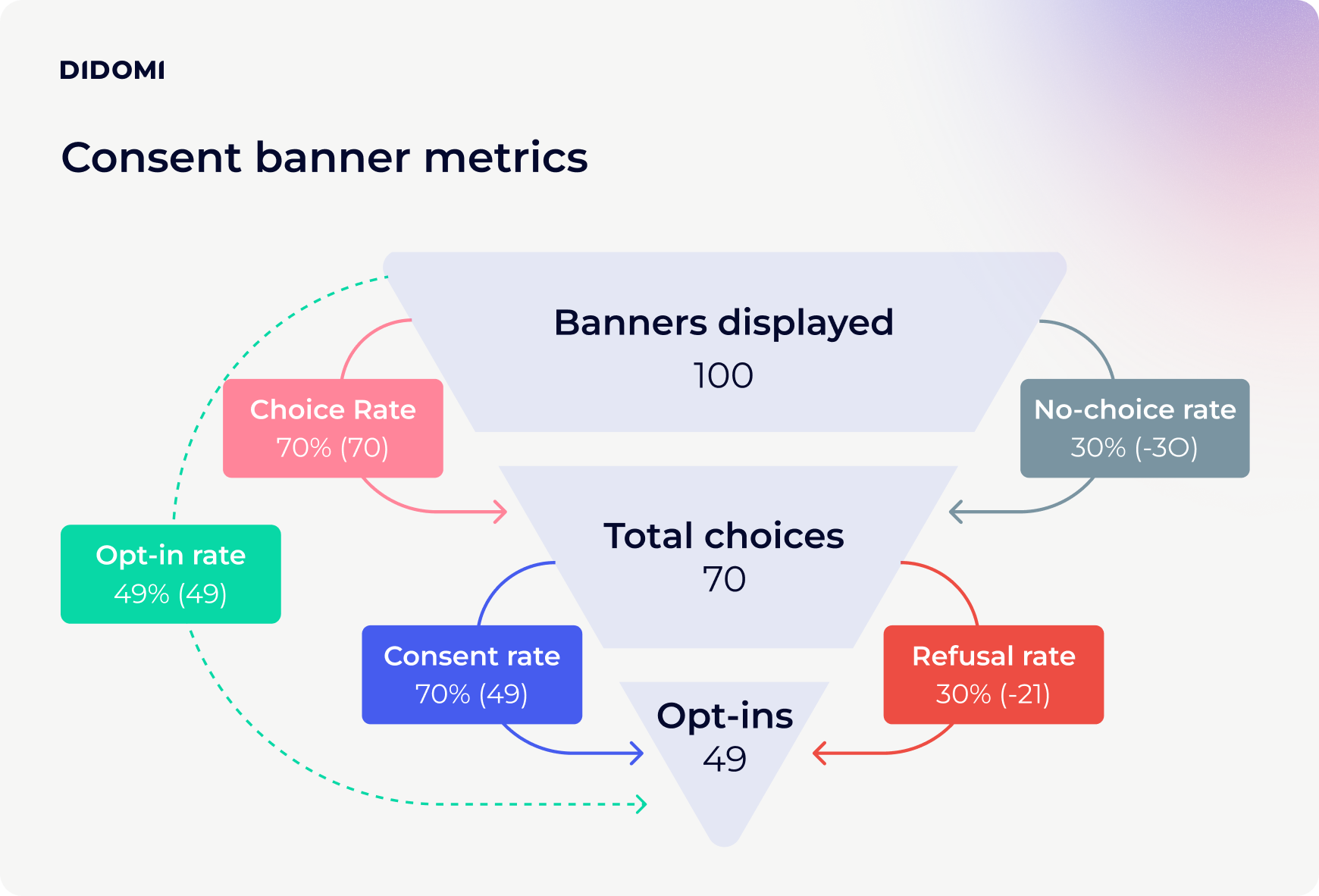
What is the opt-in rate?
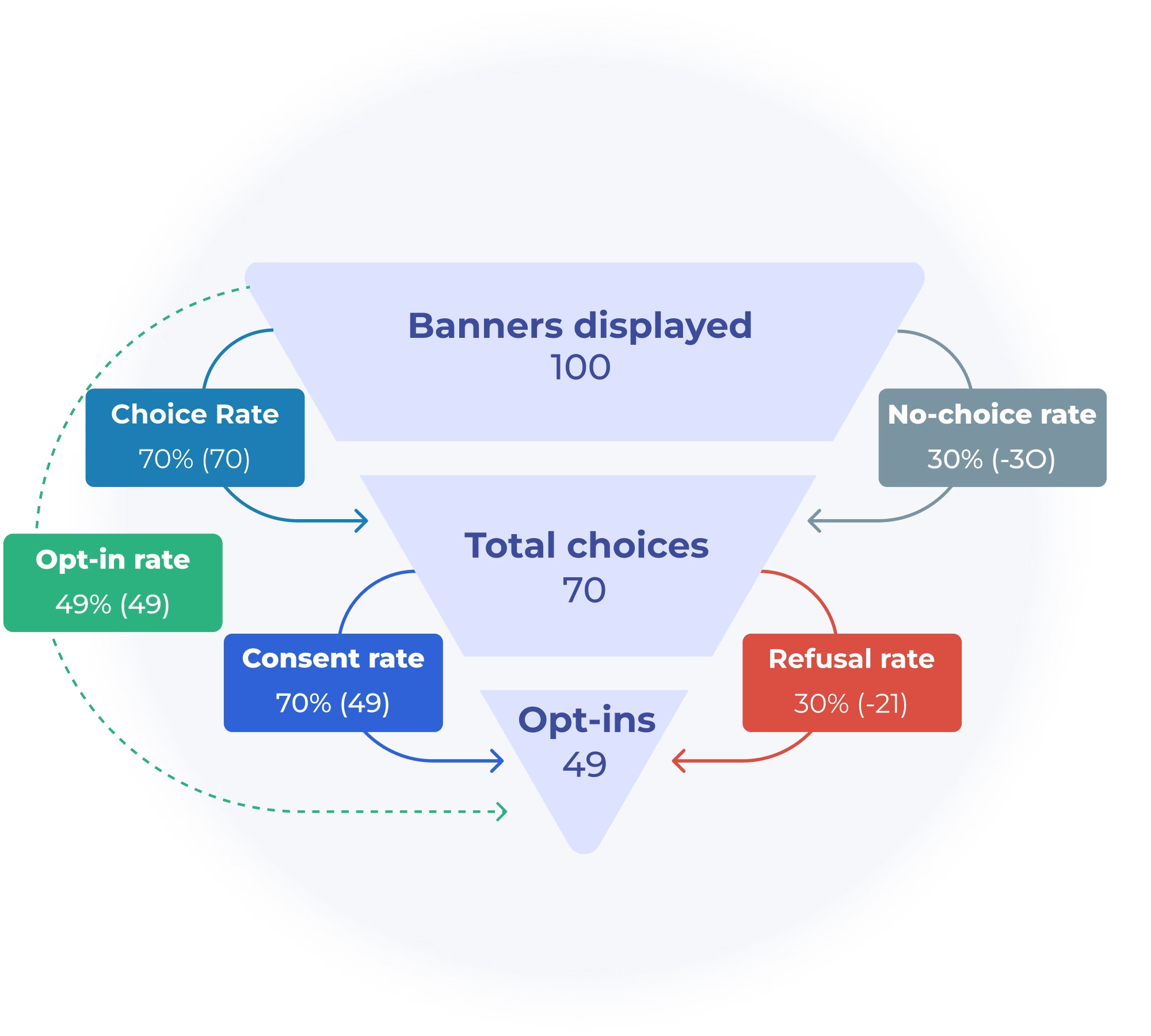
The opt-in rate is the percentage of users who consented to data collection across all banners displayed.
Opt-in rate = Opt-ins / Total banner displayed
What is the consent rate?
The consent rate is the percentage of opt-ins among all recorded choices (opt-ins + opt-outs).
Consent rate = Opt-ins / Total choices (Opt-ins + Opt-outs)
What is the opt-out rate?
The opt-out rate shows how many users declined to consent to data collection across all banners displayed.
Opt-out rate = Opt-outs / Total banner displayed
What is the refusal rate?
The refusal rate is the number of opt-outs among all users who made a choice.
Refusal rate = Opt-outs / Total choices (Opt-ins + Opt-outs)
What is the choice rate?
The choice rate measures how often users actively make a decision (opt-in or opt-out).
Choice rate = Total choices / Total banner displayed
What is the no-choice rate?
The no-choice rate indicated how often the banner was shown without any interaction recorded.
No-choice rate = No-choice / Total banner displayed
Looking beyond the click: Advanced CMP metrics
On a deeper level, more advanced metrics include:
- How often users open detailed settings
- Whether the user reviews purposes or vendors
- Whether the user changes the default selections
These can help you understand whether users are thoughtfully customizing preferences or simply clicking through. To dig further, head to our dedicated documentation on CMP metrics:
{{CMP-glossary-doc}}
Why consent banner performance matters
When analytics coverage drops or audience sizes shrink, the explanation often starts at the banner level. Understanding how your specific privacy interface performs with your audience is essential because even small changes in wording, design, or structure can significantly impact opt-in rates, refusal rates, and overall engagement.
By consistently tracking notice-level consent metrics, consent becomes a measurable, ongoing requirement. Instead of guessing how users react, companies can rely on real data to refine and optimize the consent experience over time. All that while maintaining the highest level of data protection and transparency for users.
To see how your company's approach compares across the industry, download our 2026 State of Data Privacy Benchmark Report:






.avif)